

When I first started prepping, I focused all my energy on stockpiling food, water, and gear. It wasn't until I had to evacuate during a wildfire that I realized I'd overlooked something crucial: my important documents. I spent hours frantically searching for insurance papers, medical records, and property deeds while smoke filled the horizon.
Trust me, you don't want to learn this lesson the hard way.
An emergency documents folder isn't just another item on your preparedness checklist—it's the foundation that protects your identity, finances, and legal rights when disaster strikes. In this guide, I'll walk you through creating a comprehensive emergency document system that you can grab at a moment's notice.
What Is an Emergency Documents Folder and Why It Matters
An emergency documents folder (or binder, bag, or safe) is a centralized storage system containing all your essential paperwork and information needed during a crisis. Think of it as your life's instruction manual when things go sideways.
Proper document storage can save lives—learn how to prioritize critical actions during emergencies.
Why is this so important? Because when disaster strikes:
You may need to prove your identity to receive aid
Insurance claims require documentation
Medical emergencies demand health information
Evacuation might mean crossing borders or dealing with authorities
Recovery efforts often involve extensive paperwork
Without these documents, you could face significant delays in receiving assistance, encounter legal obstacles, or lose access to your assets when you need them most.
During a flood that hit my neighborhood a few years back, my friend Mike lost everything—including his document cabinet. It took him nearly 18 months to recover financially, largely because he couldn't promptly file insurance claims or prove ownership of his property.
Essential Documents to Include in Your Emergency Folder
Creating an effective emergency documents folder isn't just about throwing papers into a binder. It requires thoughtful organization and prioritization. Here's what you should include:
1. Identification Documents
These prove who you are and your legal status:
Driver's licenses and state IDs (copies for each family member)
Passports and birth certificates
Social Security cards (or at least the numbers written down)
Marriage certificates or divorce decrees
Adoption papers
Green cards, visas, or immigration documents
Pro Tip: I keep color copies of these items rather than originals, with a note indicating where the originals are stored. This reduces risk while still providing necessary information.
2. Financial Records
These help you access your money and manage obligations during emergencies:
Bank account numbers and contact information
Credit card information (account numbers, customer service contacts)
Investment account details
Recent tax returns (last 3 years)
Loan documents (mortgage, auto, student loans)
List of bills and payment schedules
Safe deposit box information (location, key, inventory)
I learned to include a small amount of cash ($100-300) in my emergency binder after experiencing a regional power outage that knocked out ATMs and card readers for three days.
Cash access is just as crucial as identification—discover smart cash storage methods here.
3. Property Documentation
These establish ownership and help with insurance claims:
Home/property deeds
Vehicle titles and registration
Insurance policies (home, auto, life, etc.)
Home inventory (photos/video of possessions with approximate values)
Appraisals for high-value items
Warranties and receipts for major purchases
Owning tools is one thing—proving ownership post-disaster is another—prepare yourself here.
4. Medical Information
Critical during health emergencies or evacuations:
Health insurance cards and policy information
Immunization records
List of current medications and dosages
Medical history (conditions, surgeries, allergies)
Doctor contact information
Dental records
Veterinary records and pet vaccinations
Power of attorney for healthcare decisions
Living will or advance directives
A friend with a severe penicillin allergy credits her emergency medical information card with preventing a potentially fatal medication error during an earthquake response when she was unconscious.When disaster strikes, no one knows how long it will last.
5. Emergency Contact Information

Stay connected: Keep emergency contacts visible and accessible.
The communication backbone of your emergency plan:
Family members' contact details
Out-of-area emergency contacts
Employer information
School contacts for children
Attorney contact information
Insurance agent details
Utility company numbers
Local emergency services information
An emergency kit is incomplete without proper contact records—learn what to pack here.
6. Digital Backup Information
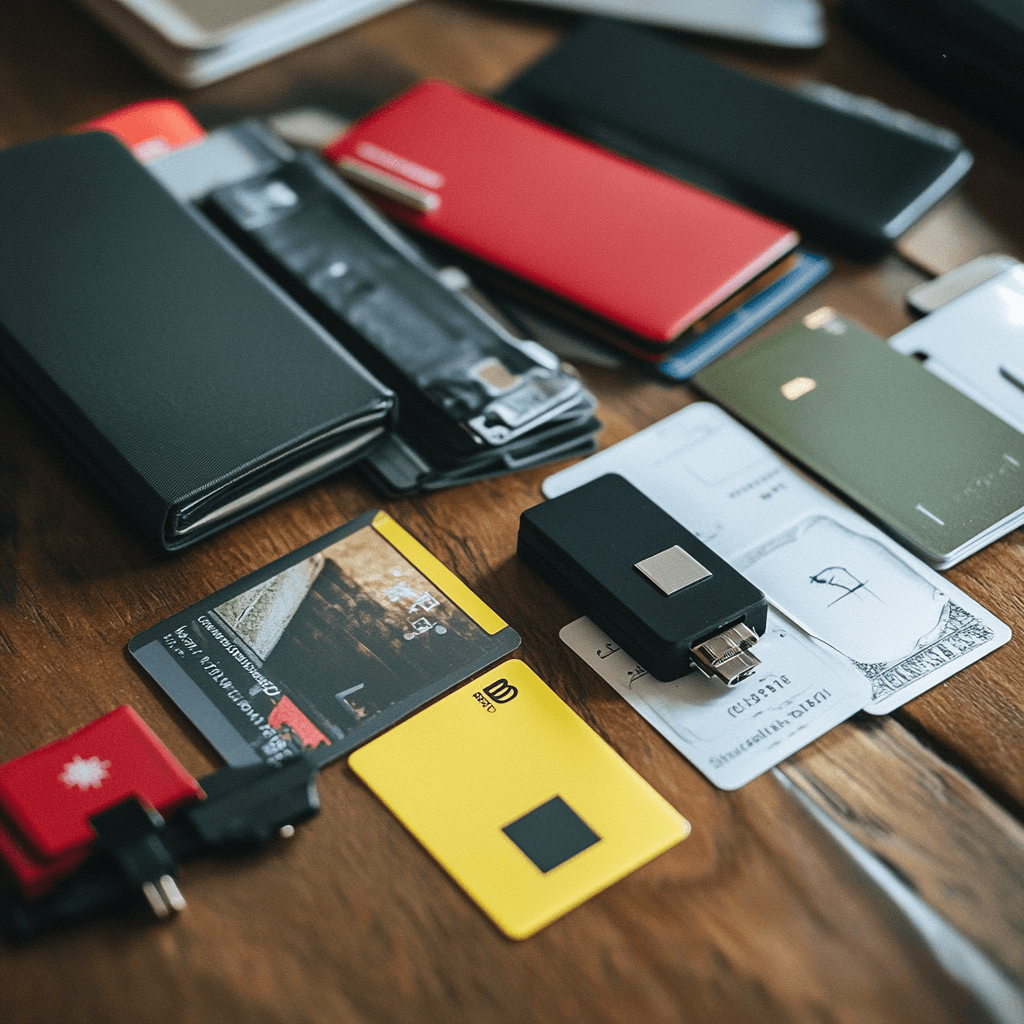
Properly storing long-lasting foods ensures you can sustain your family through extended crises.
Access your digital life when infrastructure fails:
List of important passwords (email, banking, social media)
Digital backup locations and access instructions
Cloud storage account information
Recovery codes for two-factor authentication
Creating digital backups of your documents is essential—learn how to maintain communication during outages.
7. Family Emergency Plan
Coordinates your response during crises:
Meeting locations (neighborhood and regional)
Evacuation routes and destination information
Emergency shelter locations
Communication protocols
Responsibilities of each family member
How to Organize Your Emergency Documents Effectively
Once you've gathered your documents, proper organization becomes critical. I've tried numerous systems over the years and found these approaches work best:
Use a Logical Categorization System
Group similar documents together using:
Color-coded tabs or dividers
Clear sheet protectors for fragile documents
Table of contents at the beginning for quick reference
"Grab first" section for the most critical items
I personally use a combination of color-coding (red for medical, blue for financial, etc.) and prioritization tabs (1-star through 3-star importance ratings).
Consider Family Member Sections
If you're organizing for a household:
Create individual sections for each family member
Include personalized medical information
Add school/work addresses and emergency protocols
Include recent photos of each person (useful in separation scenarios)
Create Quick-Reference Sheets
For emergencies where time is critical:
One-page summary of crucial account numbers
Emergency contact list on a single sheet
Medical conditions and medications at a glance
Home shutdown procedures (utilities, etc.)
After watching a neighbor struggle to find insurance information after a house fire, I created laminated "quick facts" cards for the front of my binder with the most essential information.
Choosing the Right Storage Solution

Secure storage: Fireproof containers help protect critical papers.
The best emergency document storage depends on your specific needs, risks, and evacuation plan. Here are your main options:
Fireproof and Waterproof Document Safes
Best for: Home storage with maximum protection
Recommended Products:
When I upgraded to the Honeywell 1114, I was amazed at how much more secure my documents felt during wildfire season. The peace of mind alone was worth the investment.
Where you store your emergency documents matters—explore secure home defense strategies here.
Portable Document Organizers
Best for: Quick evacuation and mobility
Recommended Products:
The Folio™ Document Organizer and PaperSavor™ Fireproof Bag ($79.99)
ENGPOW Fireproof Document Bag ($32.99)
Tamfile Fireproof Document Bag ($27.99)
During a hurricane evacuation, my lightweight ENGPOW bag made it easy to grab my documents and go, even while managing my kids and pets.
Multi-function Organization Systems
Best for: Comprehensive document management
Recommended Products:
Vaultz Locking File Organizer Box ($34.95)
Zippered Binder Organizer by Case-it ($22.99)
I've found that the Vaultz organizer works exceptionally well for larger families, as it accommodates both standard and legal-size documents with room for customization.
Digital Storage Options
Best for: Redundant backup and remote access
Recommended Products:
Encrypted USB drives (multiple copies)
Cloud storage services with two-factor authentication
Password managers with secure document storage
While physical copies remain essential, I maintain encrypted digital backups of all my critical documents on both a waterproof USB drive and a secure cloud service.
Setting Up a Secure Emergency File System
Now let's talk about how to implement your emergency document storage solution:
Step 1: Gather Your Documents
Set aside a weekend to collect all important papers. Check these locations:
Filing cabinets
Safe deposit boxes
Email attachments
Online accounts
Desk drawers
Stored boxes
Step 2: Sort, Scan, and Duplicate
For each document:
1. Clean and flatten the original
2. Make a color photocopy (or scan at high resolution)
3. Consider where to store the original vs. the copy
4. Decide if you need multiple copies for different locations
I spend one Sunday every six months refreshing my copies and updating my scans. Setting a recurring calendar reminder helps maintain this habit.
Step 3: Create a Master Inventory
Develop a checklist that:
Lists every document in your emergency file
Notes where originals are stored
Includes expiration dates for renewables (passports, licenses)
Records when each item was last updated
Step 4: Implement Physical Security
Protect your documents from prying eyes:
Use a locking storage solution if possible
Store in a discreet location at home
Consider a small safe deposit box for originals
Develop a secure transport method for evacuations
After a break-in at my neighbor's house targeted their documents for identity theft, I invested in a combination-locked fireproof safe hidden away from obvious storage areas.
Step 5: Set Up Digital Redundancy
Create digital backups:
1. Scan documents at 300dpi or higher
2. Save in PDF format with descriptive filenames
3. Encrypt sensitive files before storing
4. Upload to secure cloud storage
5. Create physical digital backups (USB drives)
Where to Store Your Emergency Documents Folder
Location matters almost as much as organization. Consider these options:
Home Storage Locations
Recommended spots:
Home office in a locked fireproof safe
Master bedroom closet (hidden from casual view)
Utility room in waterproof container
Basement in elevated, waterproof storage
Avoid these areas:
Kitchen (fire risk and humidity)
Garage (temperature fluctuations and theft risk)
Obvious places like desk drawers
Areas prone to leaks or flooding
I keep my primary document safe in an interior closet on the second floor—far from flood risks and less obvious to potential thieves.
Off-Site Storage Options
For redundancy, consider these secondary locations:
Bank safe deposit box
Trusted family member's home (in different geographic area)
Workplace office (for select documents)
Attorney's office
My sister and I have an arrangement where we each store copies of the other's critical documents in our respective fireproof safes, providing geographical separation of more than 100 miles.
Vehicle Emergency Kit
For immediate emergencies, keep a subset in your vehicle:
Compact waterproof pouch
Basic identification and medical information
Insurance cards
Emergency contacts
Small amount of cash
The ENGPOW Expandable File Folder ($19.99) fits perfectly in my glove compartment and holds these essentials without taking up much space.
How Often Should You Update Your Emergency Documents?
Document management isn't a one-and-done task. Here's an updating schedule that works for most preppers:
Monthly Updates
Account statements
Medication changes
Emergency contact information changes
Quarterly Reviews
Insurance policy updates
Home inventory adjustments
Password and digital access information
Annual Comprehensive Audit
Full document inventory check
Replacement of deteriorating copies
Update of expired documents
Review of storage solutions
Testing of digital backup access
I've learned to block a specific weekend each January for my annual document review, treating it as a non-negotiable appointment with myself.
Digitizing Emergency Documents: Best Practices
While physical copies remain essential, digital backups provide redundancy and accessibility. Here's how to do it right:
Scanning Guidelines
Use at least 300 dpi resolution
Scan in color when possible
Capture both sides of the documents
Save as PDF rather than JPG
Use clear, consistent file names
Organize into logical folders
Security Measures
Encrypt sensitive documents before uploading
Use a password manager with secure storage
Enable two-factor authentication on cloud services
Consider a dedicated device for document storage
Regularly test access to backups
Digital Storage Options
Encrypted USB drives stored in different locations
Cloud storage with strong security (but beware of internet outages)
Password-protected external hard drives
Secure document apps with offline access capability
I maintain a small waterproof case with an encrypted USB drive, a mini solar charger, and a basic tablet that can access my documents offline—all stored with my evacuation supplies.
Securing Sensitive Information in Your Emergency Folder
Protection against identity theft remains crucial even during emergencies:
Physical Security Strategies
Use opaque sheet protectors to obscure sensitive details
Redact some copies to show only what's necessary
Consider storing different elements of financial information separately
Use a locking mechanism on your document storage
Keep your emergency binder out of sight from visitors
Information Security Approaches
Create information cards that show only partial account numbers
Use a simple code system for passwords and PINs
Separate identification documents from financial information
Include instructions for family members about information access
After hearing about identity theft during evacuations, I now maintain different security levels within my emergency binder—with the most sensitive information in a separate, hidden compartment.
Losing your ID can mean losing access to care—get self-reliant medical knowledge.
Making Your Emergency Folder Portable for Quick Evacuation
When disaster strikes, you may have minutes or even seconds to evacuate. Here's how to ensure your documents are ready to go:
Portability Considerations
Weight: Can you carry it comfortably while managing other items?
Size: Does it fit in your evacuation bag or vehicle?
Accessibility: Can you grab it quickly in the dark or under stress?
Weather protection: Will it survive rain, snow, or extreme heat?
Grab-and-Go Solutions
Shoulder strap document bags
Compact fireproof pouches
Backpack with dedicated document section
Car emergency kit with document storage
I keep my Savor PaperSavor™ Cross-Body Bag ($49.99) hanging on a hook near my front door, ready to grab during any middle-of-the-night evacuation.
Creating Family Emergency Information Cards
In addition to your comprehensive document storage, create portable information cards for each family member:
What to Include

Divide and conquer: Categorize your documents for fast access.
Name, DOB, and ID numbers
Emergency contacts (local and out-of-area)
Medical conditions and allergies
Blood type and medications
Meeting locations and communication plan
Pet information
Card Format Options
Laminated wallet-sized cards
USB drive on keychain with encrypted files
QR code linking to secure information
Medical alert bracelet with essential information
These compact cards proved invaluable when my family was separated during a flash flood evacuation and cell service was down for three days.
Special Considerations for Outdoor Enthusiasts and Adventurers
If you're frequently in the backcountry or traveling, consider these special document precautions:
Adventure-Specific Documents
Backcountry permits and reservations
Detailed itineraries with check-in times
Maps with marked routes
Specialized insurance (evacuation, extreme sports)
International travel documents
Emergency contact plan specific to remote areas
Ultralight Document Solutions
MoKo Fireproof Document Bag ($19.99) - weighs just 4 oz
During a mountaineering expedition, my ultralight document pouch saved crucial information when my pack got soaked crossing a river. The waterproof protection kept my permits, emergency contacts, and insurance information perfectly dry.
Maintaining Your Emergency Document System
The effectiveness of your emergency file system depends on consistent maintenance:
Create a Maintenance Schedule
Set calendar reminders for document updates
Establish a routine check of storage conditions
Plan the replacement of aging containers or folders
Schedule testing of digital backup access
Assign Responsibility
Designate a primary family document manager
Create clear instructions for others to access if needed
Share basic knowledge of the system with trusted family members
Practice accessing critical information in simulation drills
I've found that treating document maintenance like any other essential prep—with checklists, schedules, and practice drills—ensures the system works when I need it most.
Conclusion: Peace of Mind Through Preparation
After experiencing multiple emergencies where documentation made all the difference, I can confidently say that few preparedness investments offer better returns than a well-organized emergency document system.
When the unexpected happens—whether it's a natural disaster, medical emergency, or family crisis—having your critical information organized and accessible provides priceless peace of mind and practical advantage.
Start small if you're feeling overwhelmed. Begin with just identification and insurance documents, then gradually build your system. Even an incomplete emergency document folder is infinitely better than none at all.
Have you created an emergency document system? What storage solutions have worked best for your situation? Share your experiences in the comments below—your insights might help another reader prepare more effectively.
And remember: the time to organize your emergency documents is always now, before you need them.
AATF Survival does not agree with all the statements provided in the given content.
Your source for expert survival strategies and emergency preparedness tips.

Privacy policy | Terms of use | Cookies